Steps at a glance
- Open the Retours page and search for the receipt number.
- Select the sale and click Rembourser cette vente.
- Enter the quantity returned in À rembourser for each product.
- Enter the Motif du retour.
- Click Valider le remboursement and confirm.
How a return works
- The original sale is neither changed nor deleted: a new sale of type Retour (return), with a negative total, is created and points to it.
- The refunded quantities go back into stock, into the product's most recent batch.
- If the user has an open shift, the amount is deducted from the expected cash and appears in the Retours card on the Caisse page.
- The operation is recorded in the Journal d'Activité (activity log) with the user and the amount.
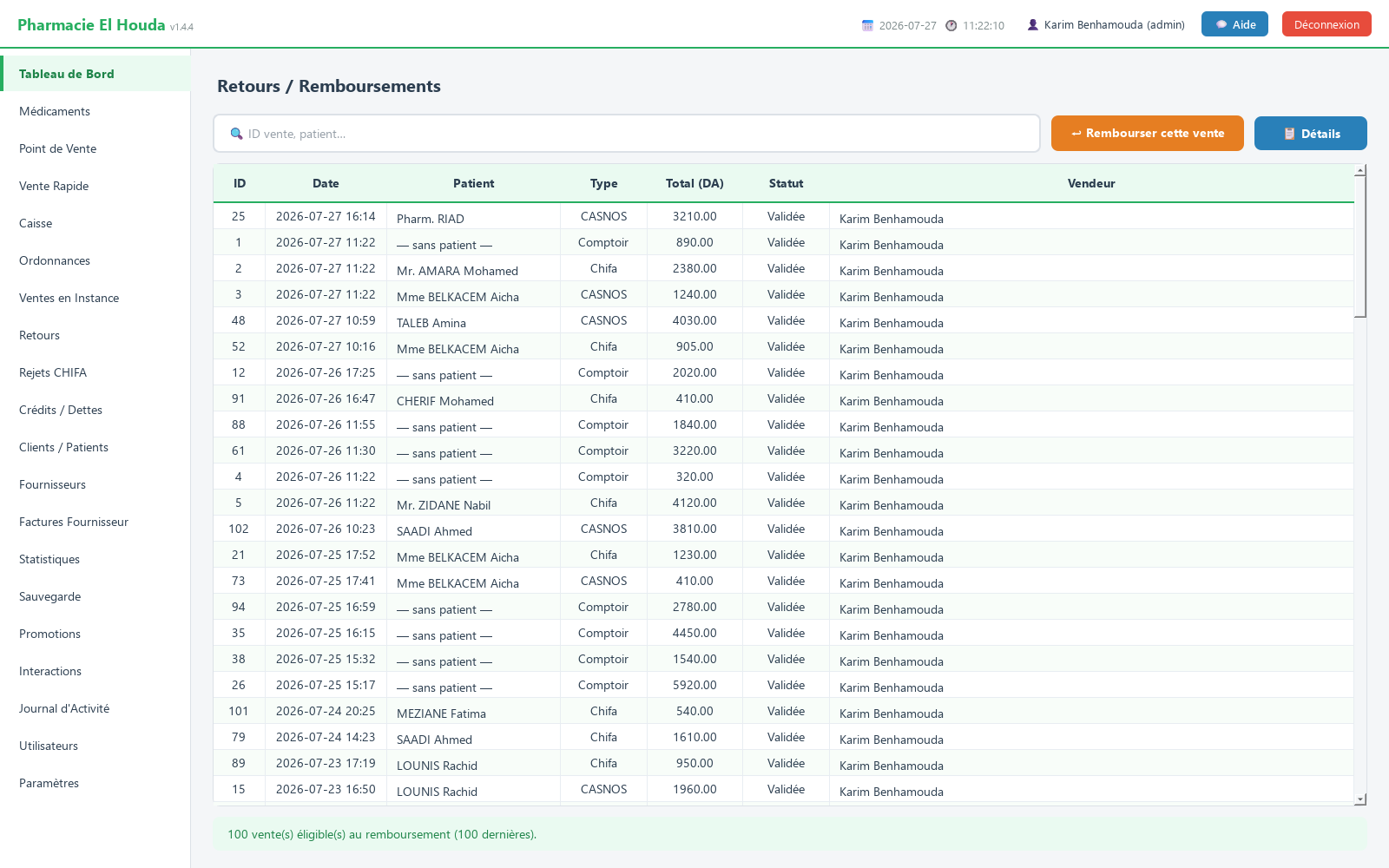
Finding the sale
The page lists the last 100 confirmed sales (returns excluded). Columns: ID, Date, Patient, Type, Total (DA), Statut, Vendeur (status, sales assistant).
- Search in 🔍 ID vente, patient… (sale ID, patient) by sale number (printed on the receipt: Ticket N°) or by patient name.
- A sale that has already been partly refunded carries the note (déjà N retour(s)) (already N returns) in the Statut column.
- 📋 Détails (details) shows the sale's lines (product, quantity, price) before you decide.
Recording the refund step by step
- Select the sale and click ↩ Rembourser cette vente (refund this sale), or double-click it.
- The Remboursement — Vente #N (refund — sale #N) window recalls the date, the patient, the original total and its type.
- In the table (Médicament, Vendu, Déjà remb., À rembourser, P.U. (DA), Sous-total remb. (DA): medicine, sold, already refunded, to refund, unit price, refund subtotal), enter in À rembourser the quantity returned for each product. Maximum = sold − already refunded.
- Check the Total à rembourser (total to refund).
- Enter the Motif du retour : (reason for return: faulty product, entry error…).
- Click Valider le remboursement (confirm refund), then confirm. The message Retour #N enregistré (return #N recorded) shows the amount refunded and the units put back in stock.
Partial and successive returns
You can refund part of a line (one box out of three), then the rest later. Each time, the Déjà remb. column is recalculated from the previous returns and the quantity sold cannot be exceeded. Once everything has been refunded, the À rembourser column can no longer be edited.
Effects on stock, the cash register and statistics
| Item | Effect |
|---|---|
| Stock | + refunded quantity, in the most recent batch |
| Cash register | − amount, in the open shift of the user entering the return |
| Statistics | The return is a negative sale that reduces the period's revenue |
| Payment method | Taken from the original sale |
Cases that need attention
- Faulty or expired product: the return puts it back into sellable stock automatically. If it can no longer be sold, then correct its quantity in Médicaments.
- Credit sale: refunding it does not change the debt recorded in Crédits / Dettes. Adjust or settle the debt manually.
- Loyalty points: the return does not remove the points earned and does not give back the points used.
- Pending sale: it does not appear in the list; cancel it in Ventes en Instance (pending sales) → ↺ Annuler (rendre stock) (cancel, return stock).
- A return is final: no button cancels it. Check the quantities before confirming.
Frequently asked questions
How do I record a medicine return in PharmaPro?
Retours page: search for the sale by its receipt number, click Rembourser cette vente, enter the quantity in À rembourser and the reason, then Valider le remboursement.
Does the returned product go back into stock?
Yes, the quantity is added to the product's most recent batch. If it can no longer be sold, correct the quantity in Médicaments.
Can I refund only part of the sale?
Yes, the quantity is entered line by line and the rest can be refunded later, without exceeding the quantity sold.
Why doesn't a sale appear in returns?
The list shows the last 100 confirmed sales; search by number or patient. A pending sale is not listed and is cancelled from Ventes en Instance.
Try PharmaPro in your pharmacy
15 days free with every feature, then 45 000 DZD once.
Download and try freeBuy the licence