Window areas
- Top bar: pharmacy name and version, date and time (in red with ⚠ if the PC clock is wrong), user and role, the 💬 Aide (help) button and the Déconnexion (sign out) button, which returns to the sign-in screen.
- Side menu: the pages, with a scroll bar on small screens. The active page is highlighted.
- Work area: the selected page; its data is reloaded each time it is opened.
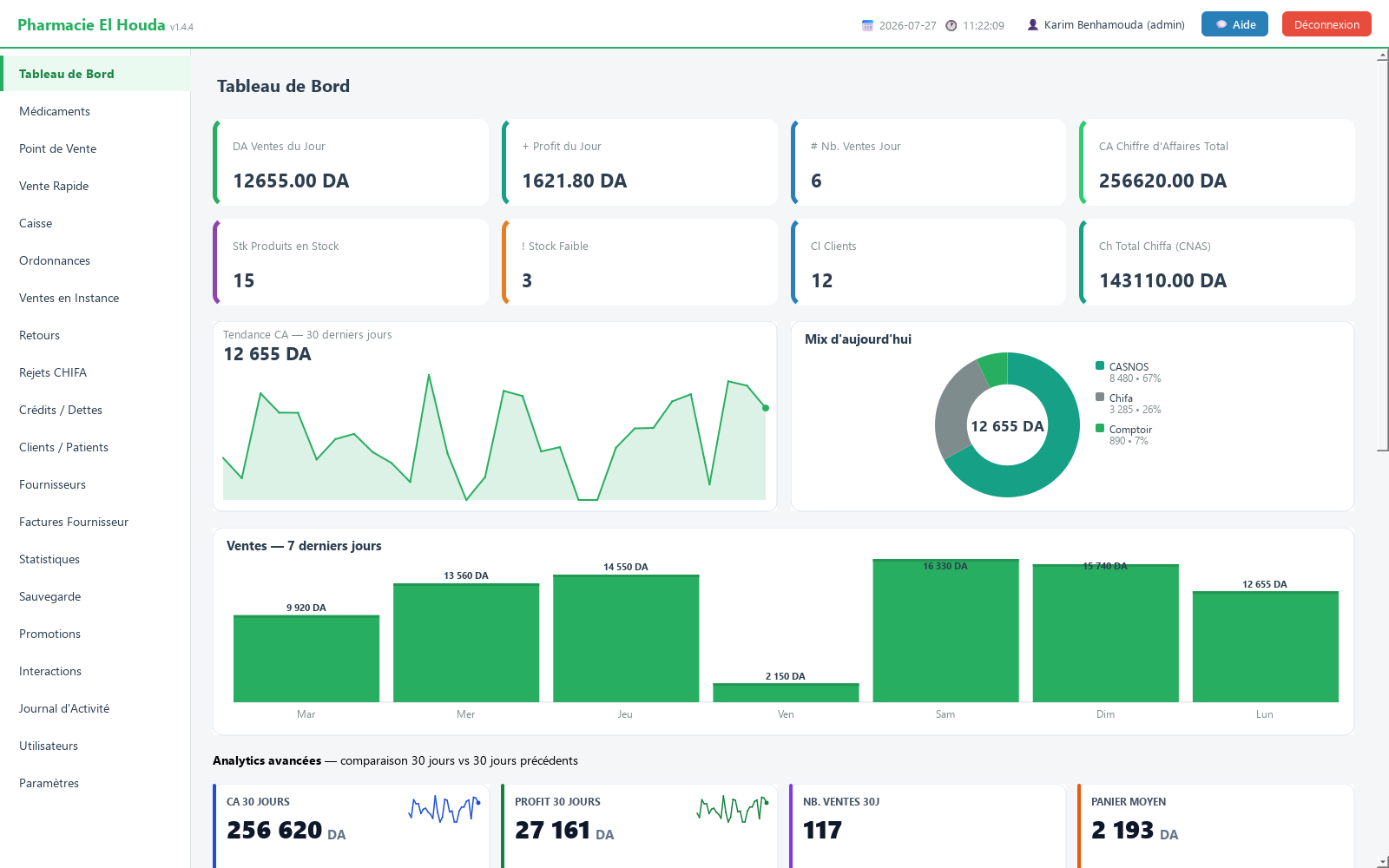
The dashboard
Indicator cards:
- Administrator only: Ventes du Jour (today's sales), Profit du Jour (today's profit), Nb. Ventes Jour (number of sales today), Chiffre d'Affaires Total (total revenue), Total Chiffa (CNAS).
- Everyone: Produits en Stock (products with a positive quantity), Stock Faible (below the threshold, out-of-stock included), Clients.
Charts (administrator): Tendance CA — 30 derniers jours (revenue trend, last 30 days), Mix d'aujourd'hui (today's breakdown by sale type), Ventes — 7 derniers jours (sales, last 7 days), then the Analytics avancées area, which compares the last 30 days with the previous 30 (revenue, profit, number of sales, average basket), the Affluence des ventes map of sales by day and hour, and the Top 10 médicaments (CA 30j) (top 10 medicines by 30-day revenue).
Alerts (everyone):
- Red box ⚠ TOTAL DES DETTES NON PAYÉES (total unpaid debts) with the 10 largest debtors, shown when there are outstanding debts.
- Orange box ⚠ REJETS CHIFA EN ATTENTE (pending CHIFA rejections): number and amount of rejections marked “En attente” (pending) or “Re-déposé” (resubmitted).
- ALERTE PÉREMPTION (expiry alert): up to 8 products whose date expires within the configured alert period.
- STOCK FAIBLE (low stock): up to 8 products below the threshold.
- VISITES PATIENTS À VENIR (upcoming patient visits): up to 5 patients with a next visit coming up soon.
The Ventes Récentes (recent sales) table (administrator) shows the last 15 sales of the day: time, amount, type, payment method, profit, sales assistant.
Keyboard shortcuts
Shortcuts exist only in the two sales screens:
| Key | Action | Page |
|---|---|---|
| F2 | Go to the search field | Point de Vente |
| Enter | Add the selected or scanned product | Both |
| + / − | Increase / decrease the selected basket line | Point de Vente |
| Del | Remove the selected line | Point de Vente |
| F12 | Check out | Both |
| Ctrl+Enter | Check out (alternative to F12) | Point de Vente |
| Ctrl+D | Credit sale | Point de Vente |
| Ctrl+I | Pending sale | Point de Vente |
| Esc | Clear the search, then the basket if the search is empty | Both |
On the sign-in screen, pressing Enter in the password field is enough. In most tables (medicines, prescriptions, returns, debts, rejections), double-clicking opens the row.
Windows shown at startup
- Chronic patient reminder (about 2 seconds after opening): the Rappel — patients chroniques (reminder — chronic patients) window lists patients whose Maladie Chronique (chronic disease) field is filled in. It opens on patients who are overdue or expected within 7 days; the Afficher tous les patients chroniques (show all chronic patients) box shows the full list. Each Algerian number has a WhatsApp button. The 🔔 Afficher ce rappel : (show this reminder) choice offers “À chaque ouverture du programme” (every time the program opens, the default), a day of the week or “Jamais (désactivé)” (never, disabled); the 🔊 Son à l'ouverture (sound on opening) box turns the chime on or off. The same setting exists in Paramètres → Rappel des patients chroniques. With no chronic patient recorded, the window is not shown.
- Update (after 5 seconds): Mise à jour PharmaPro disponible (update available) if a new version exists.
- Clock check (after 8 seconds): alert Date de l'ordinateur incorrecte (incorrect computer date) if the Windows date is wrong. Correct it and restart; sales already recorded are not lost.
Arabic language and text size
- Open Paramètres → Langue de l'interface (interface language) and choose العربية (Arabic).
- Click 💾 Enregistrer les Paramètres (save settings).
- Close and restart PharmaPro: the interface switches to right-to-left and the translated labels are shown in Arabic.
To enlarge the text: Paramètres → Affichage (display) → font size (10 to 24).
Asking for help from within the software
The 💬 Aide button opens Demande d'assistance (support request): phone number for the WhatsApp call-back, optional e-mail, description of the problem (10 characters minimum) and severity level. The same window lets you start remote assistance with RustDesk, a free tool. You can also write to support on WhatsApp at 0666 50 79 35 or to support@tkawen.com.
Frequently asked questions
Why can't a sales assistant see the revenue?
The financial cards, the charts and the recent sales are reserved for the admin role. The worker role sees the stock and the alerts.
What are the point-of-sale keyboard shortcuts?
F2 search, Enter add, + and − quantity, Del remove the line, F12 or Ctrl+Enter check out, Ctrl+D credit, Ctrl+I pending, Esc clear.
How do I switch PharmaPro to Arabic?
Paramètres → Langue de l'interface → العربية, click Enregistrer les Paramètres, then restart the software.
How do I stop the chronic patient reminder from appearing every time the program opens?
In the reminder window or in Paramètres → Rappel des patients chroniques, choose a day of the week or Jamais (désactivé).
Try PharmaPro in your pharmacy
15 days free with every feature, then 45 000 DZD once.
Download and try freeBuy the licence