Steps at a glance
- Log in as admin and open Paramètres.
- Fill in the pharmacy's name, address and phone number.
- Complete the tax information (RC, NIF, NIS, tax article number).
- Set the low-stock threshold, the expiry alert and the chronic-patient reminder.
- Click 💾 Enregistrer les Paramètres.
Pharmacy and tax information
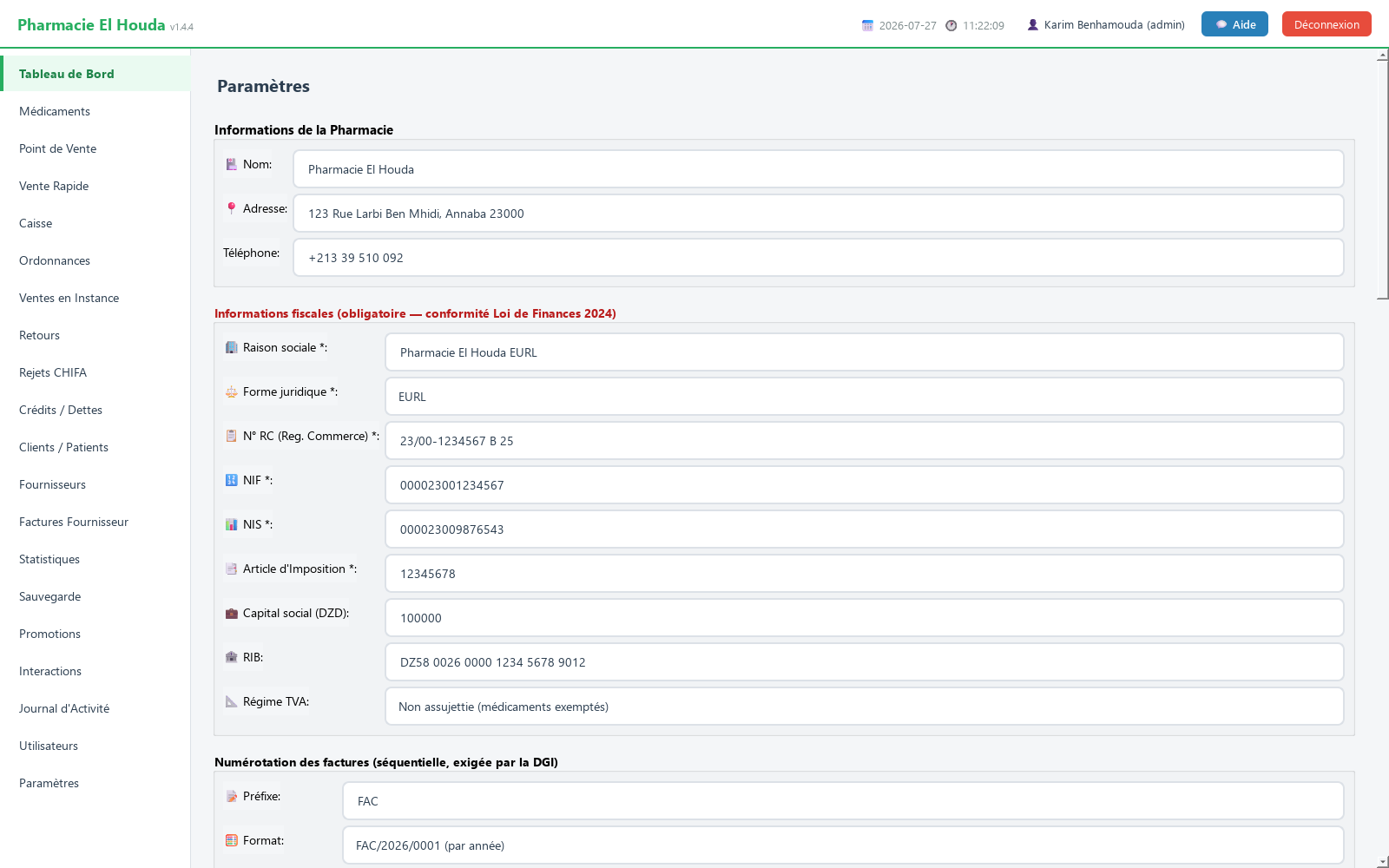
Informations de la Pharmacie (pharmacy details): 🏥 Nom:, 📍 Adresse:, Téléphone: — printed at the top of the receipt.
Identité du logiciel (optionnel) (software identity): Nom affiché: (display name), Logo: (Choisir… button, png/jpg/svg image), Mention légale: (legal notice). They change the name shown on the login screen, in window titles and in the licence window, after a restart. Purely visual: updates and the licence are not affected.
Informations fiscales (obligatoire — conformité Loi de Finances 2024) (tax information, required under the 2024 Finance Act):
- 🏢 Raison sociale *: (business name), ⚖️ Forme juridique *: (legal form: Personne Physique, EURL, SARL, SPA, SNC, Auto-entrepreneur).
- 📋 N° RC (Reg. Commerce) *: (trade register number), 📑 Article d'Imposition *: (tax article number).
- 🔢 NIF *: and 📊 NIS *: (tax and statistical IDs): exactly 15 digits each, otherwise saving is refused (« NIF invalide » / « NIS invalide »).
- 💼 Capital social (DZD): (share capital, for companies), 🏦 RIB: (bank details), 📐 Régime TVA: (VAT regime: Non assujettie (médicaments exemptés) — not liable, medicines exempt — or Assujettie à la TVA (parapharmacie) — liable for VAT, parapharmacy).
Invoice numbering
Numérotation des factures (séquentielle, exigée par la DGI) (sequential numbering, required by the DGI tax authority):
- 📝 Préfixe: — FAC by default.
- 🧮 Format: — FAC/2026/0001 (per year), FAC-0001 (continuous, no year) or 0001/2026 (number/year).
- 🔢 Prochain numéro: — the next number suggested.
This number is suggested in 📄 N° Facture when you create a supplier invoice; the counter only advances if you keep the suggested number.
Alerts, thresholds and the chronic-patient reminder
Alertes et Seuils (alerts and thresholds):
- Seuil stock faible : (low-stock threshold; 10 by default) — below it, the product is counted as "low stock" on the dashboard and in the statistics.
- Alerte peremption (jours) : (expiry alert, days; 30 by default) — time before expiry that triggers the alert. It is also used as the window for the dashboard's « VISITES PATIENTS À VENIR » alert.
- Rappel des patients chroniques : (chronic-patient reminder) — À chaque ouverture du programme (default), Chaque lundi … Chaque dimanche, or Jamais (désactivé). Details: Clients / Patients.
Affichage (display): 📏 Taille de police: (font size) from 10 to 24 (14 by default), with a live Aperçu: (preview).
Loyalty and language
Programme de fidélité (loyalty programme): 💎 Carte fidélité : (Désactivé / Activé), DA dépensés pour 1 point gagné : (100), Valeur en DA d'1 point utilisé : (1). See Clients and loyalty.
Langue de l'interface (interface language): Français or العربية. The change takes effect after a restart and switches the interface to right-to-left. The Arabic translation is partial: untranslated text stays in French.
Remote monitoring: Telegram and phone on the local network
Surveillance à distance (Telegram) (remote monitoring) — every sale and the alerts on your phone, even when you are away from the pharmacy:
- In Telegram, open
@BotFather→/newbotand copy the TOKEN. - Paste it into Token : and choose the Heure du résumé quotidien : (daily summary hour; 20 by default).
- Click ▶ Activer la surveillance (enable monitoring).
- Open your bot on the phone and tap Start (
/start). - Click Envoyer un test (send a test) to check.
Commands from the phone: /jour, /ventes, /stock, /caisse, /dettes, /chroniques. To stop: ■ Désactiver.
Accès Mobile (LAN) (mobile access) — a read-only web page, opened in the browser of a phone connected to the same Wi-Fi (not an app): set Port HTTP : (8080) and Mot de passe : (password, required), then ▶ Démarrer le serveur (start the server); the address to type on the phone is shown. ■ Arrêter shuts it down. The server does not restart by itself when the program opens.
Synchronisation vers HQ (sync to head office) — only for a chain with a central server: URL serveur HQ :, Jeton :, 🔌 Tester, ⇧ Synchroniser maintenant, Sync automatique :, Intervalle (minutes) : (5). Independent pharmacy: leave this section empty.
Data, backup and security
- Sauvegarde Cloud Chiffrée (zero-knowledge) (encrypted cloud backup): ☁️ Configurer & sauvegarder maintenant button — see Backup.
- Données & Diagnostic (data and diagnostics): database path, size, number of sales, products, invoices and clients, with 📂 Ouvrir le dossier, 💾 Sauvegarde locale maintenant and 🔄 Vérifier.
- 🔒 Sécurité — Statistiques: 🔑 Mot de passe des statistiques : (statistics password) — if set, it is asked for every time Statistiques is opened. Leave it empty to disable it.
Save and reset
- After making changes, click 💾 Enregistrer les Paramètres (save settings); the « Paramètres enregistrés! » message appears and the save is logged.
- Some buttons act immediately, without this button: starting/stopping the mobile server, enabling/stopping Telegram, sync buttons, backups.
Frequently asked questions
Where do I enter the NIF, NIS and trade register number in PharmaPro?
In Paramètres → Informations fiscales. The NIF and NIS must have exactly 15 digits; then click 💾 Enregistrer les Paramètres.
How do I switch the interface to Arabic?
Paramètres → Langue de l'interface → العربية → 💾 Enregistrer les Paramètres, then restart the software. The translation is partial.
How can I follow the pharmacy's sales from my phone?
Enable Surveillance à distance (Telegram) with a bot token obtained through @BotFather, then send /start in the bot: sales, alerts and the daily summary arrive on your phone.
How do I make the font larger?
Paramètres → Affichage → Taille de police (10 to 24), then save.
Try PharmaPro in your pharmacy
15 days free with every feature, then 45 000 DZD once.
Download and try freeBuy the licence