Steps at a glance
- Download PharmaPro-Setup.exe from tkawen.com/pharmapro/download.
- Run the installer and follow the wizard, leaving the Lancer PharmaPro box ticked.
- In Activation de Licence, fill in the Démo gratuite 15 jours tab and click Activer ma démo de 15 jours.
- Sign in with admin / admin2026.
- Change the administrator password in Utilisateurs.
- Enter the pharmacy details in Paramètres, then click Enregistrer les Paramètres.
Requirements
- Operating system: Windows 10 or Windows 11, 64-bit. The installer refuses older versions (Windows 7, 8) and 32-bit systems.
- No administrator rights needed: the installation is done for the current Windows account.
- Internet connection: required to activate the trial or the key, then at least once every 14 days to revalidate the licence (see Licence). Daily work (sales, stock) runs offline.
- Receipt printer: optional. The receipt is sent to the Windows printer; without a printer, it is saved as a text file.
- Barcode scanner: optional. Any scanner that “types” the code into the search field and then sends Enter works with the point of sale.
- PC date and time: they must be correct. PharmaPro compares the PC clock with the server clock and shows the alert Date de l'ordinateur incorrecte (incorrect computer date) when the gap exceeds 12 hours, because a wrong date files sales under the wrong day.
Download and install
- Download the official installer: PharmaPro-Setup.exe.
- Double-click the file. The wizard is in French.
- Keep the suggested folder (
TKAWEN\PharmaPro) unless you have a specific reason not to. - Leave the options Créer une icône sur le Bureau (desktop icon) and Creer un raccourci dans le menu Demarrer (Start menu shortcut) ticked.
- At the end, leave the Lancer PharmaPro (launch PharmaPro) box ticked and click Terminer (finish).
First launch: 15-day free trial
On first launch, the Activation de Licence (licence activation) window opens. It shows the computer's Identifiant machine (HWID) (machine ID) and two tabs: Démo gratuite 15 jours (15-day free demo) and J'ai déjà une clé (I already have a key).
To start the trial (every feature, no bank card):
- Stay on the Démo gratuite 15 jours tab.
- Fill in the required fields: Nom complet * (full name), WhatsApp * (at least 9 digits), Nom de l'officine * (pharmacy name) and Wilaya * (province). The Email field is optional.
- Click Activer ma démo de 15 jours (activate my 15-day demo) while connected to the Internet.
- The message ✅ Démo activée pour 15 jours. Bonne découverte ! (demo activated for 15 days) appears and the sign-in window opens.
If you have already bought a key, go straight to the J'ai déjà une clé tab: see Licence and activation.
First sign-in and securing the administrator account
The database is created automatically on first launch, with a default administrator account:
| Field | Default value |
|---|---|
| Username | admin |
| Password | admin2026 |
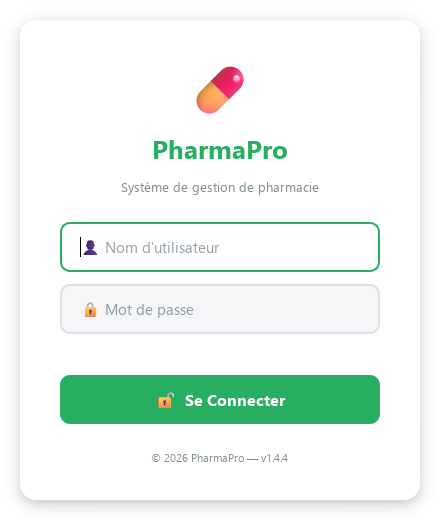
- Enter the username and password, then click Se Connecter (sign in) or press Enter.
- Open the Utilisateurs (users) page, select
admin, click 🔑 Changer Mot de Passe (change password), enter the new password, then 💾 Changer. - Create one account per sales assistant with ➕ Ajouter Utilisateur (add user) and the
workerrole. A sales assistant sees the operational pages, but not the financial figures on the dashboard, nor Statistics and Settings.
Setting up the pharmacy
Open Paramètres (settings, administrator only), fill in the following sections, then click 💾 Enregistrer les Paramètres (save settings):
- Informations de la Pharmacie (pharmacy information): name, address, phone. They appear on receipts and PDFs.
- Informations fiscales (tax information): registered company name, legal form, RC number (trade register), NIF, NIS, tax article. They are printed at the bottom of the receipt.
- Alertes et Seuils (alerts and thresholds): Seuil stock faible (low-stock threshold, 10 by default), Alerte peremption (jours) (expiry alert in days, 30 by default) and Rappel des patients chroniques (chronic patient reminder).
- Affichage (display): font size from 10 to 24 (14 by default) with a preview.
- Langue de l'interface (interface language): French or Arabic (العربية). The change takes effect after a restart; the interface then switches to right-to-left.
Next step: enter or import your products, see Medicines and catalogue import.
Data location and backups
- The database is stored in the user profile:
%LOCALAPPDATA%\TKAWEN\PharmaPro\data\pharma.db, not in the program folder. An update or a reinstallation does not touch it. - At every launch, a timestamped copy is created in
%LOCALAPPDATA%\TKAWEN\PharmaPro\backups; the 30 most recent are kept. - Receipts saved as text files are in
data\receipts.
backups folder regularly to an external drive or a USB stick: a backup left on the same disk does not protect you from that disk failing.Automatic updates
About five seconds after the main window opens, PharmaPro checks in the background whether a new version exists. If so, the Mise à jour PharmaPro disponible (update available) window shows the version, the release notes and the size.
- Click Installer maintenant (install now), or Plus tard (later) to postpone (this button does not exist if the update is mandatory).
- After the download, confirm: PharmaPro closes, installs the new version and restarts on its own.
Frequently asked questions
Does PharmaPro run on Windows 7 or on 32-bit Windows?
No. The installer requires 64-bit Windows 10 or Windows 11 and refuses older systems.
What are the default username and password?
Username admin, password admin2026. Change it immediately from the Utilisateurs (users) page with the Changer Mot de Passe button.
Do I need the Internet to use PharmaPro?
Yes to activate the trial or the key, then at least once every 14 days to revalidate the licence. Sales and stock management work offline.
Does reinstalling erase my data?
No. The database is in %LOCALAPPDATA%\TKAWEN\PharmaPro\data; neither uninstalling nor updating deletes it.
How long is the free trial?
15 days with every feature, no bank card, one trial per computer.
Try PharmaPro in your pharmacy
15 days free with every feature, then 45 000 DZD once.
Download and try freeBuy the licence