Steps at a glance
- At the Point de Vente, fill the basket and press Ctrl+D.
- Enter Nom, Prénom, phone and down payment, then Confirmer la Dette.
- When the customer pays, open Crédits / Dettes and select the debt.
- Click Payer and enter the amount received.
- Click Payer or Solder entièrement.
Selling on credit from the point of sale
- At the Point de Vente (point of sale), fill the basket.
- Click ⚠ Crédit [Ctrl+D] or press Ctrl+D. The 💳 Créer une Dette (create a debt) window shows the total and the number of products.
- Fill in the fields (table below).
- Click 💳 Confirmer la Dette (confirm the debt). The message Dette créée (debt created) summarises the total, the down payment and the balance.
| Field | Meaning |
|---|---|
| 👤 Nom * and 👤 Prénom * | Surname and first name of the debtor (required) |
| Téléphone | Optional, useful for reminders |
| 🪪 Carte ID | Identity card number, optional |
| 💵 Acompte (DA) | Amount paid straight away (down payment); must be less than the total |
| 📝 Remarques | Free-text note |
A credit sale is a real sale: the stock is deducted (FEFO) and the sale appears in the statistics with the payment method Crédit. If even one line is short of stock, nothing is recorded.
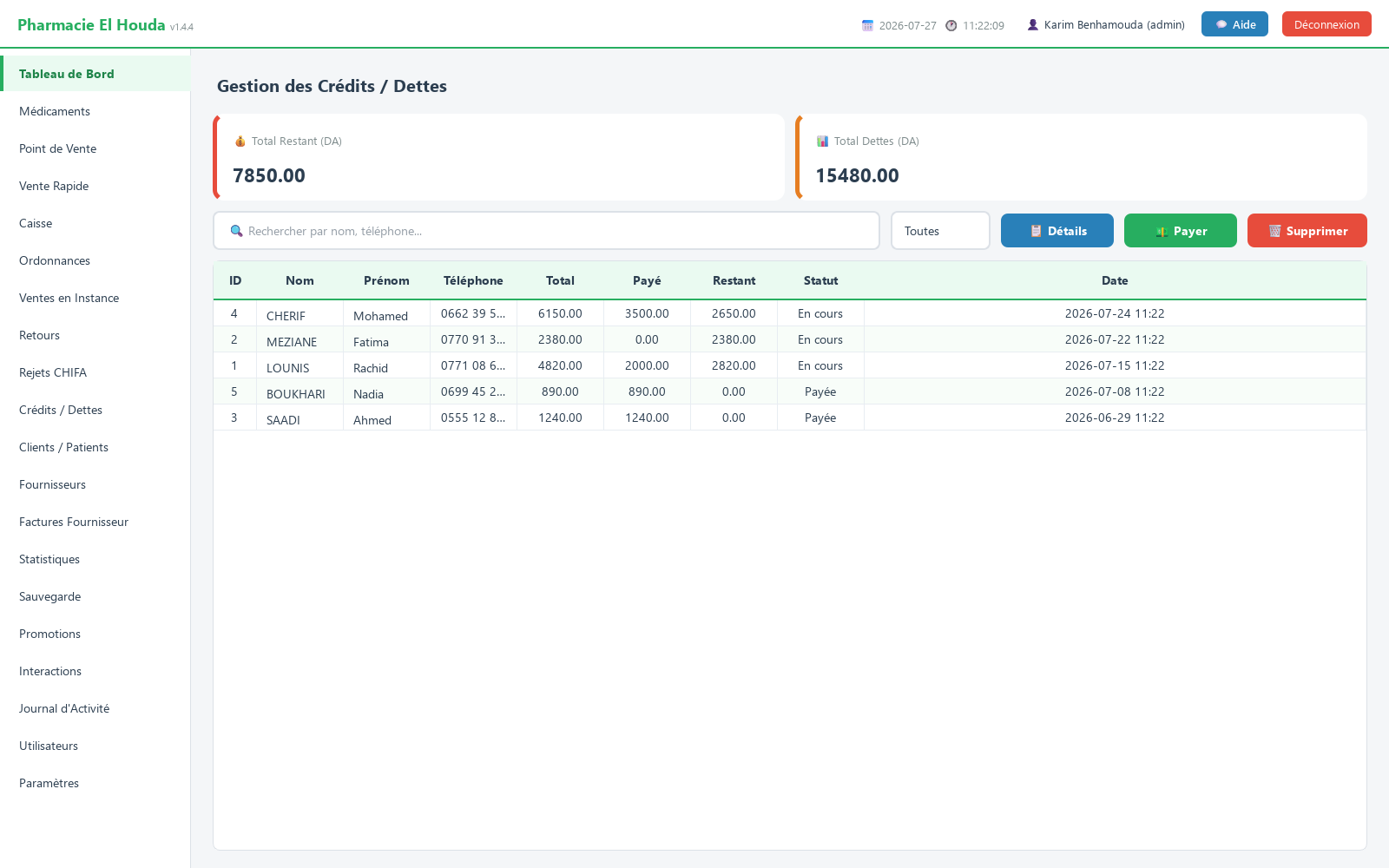
The Crédits / Dettes page
- Two cards: Total Restant (DA) (total outstanding) and Total Dettes (DA) (total debts), calculated on the rows displayed.
- The 🔍 Rechercher par nom, téléphone... (search by name, phone) search covers the surname, first name, phone and identity card.
- Filter: Toutes (all), En cours (open), Soldée (settled).
- Columns: ID, Nom, Prénom, Téléphone, Total, Payé, Restant (in red if something is still owed), Statut, Date (paid, outstanding, status).
Recording a payment
- Search for the customer and select their debt.
- Click 💵 Payer (pay): the window recalls the total, the amount already paid and the balance.
- In 💵 Montant à payer (DA): (amount to pay), enter the sum received (the balance is suggested and cannot be exceeded). 📝 Remarques: is optional.
- Click 💵 Payer for a partial payment, or ✅ Solder entièrement (settle in full) to pay off the whole balance.
- The message Paiement enregistré (payment recorded) shows the status; when the balance reaches zero, the debt changes to Soldée.
Payment details and history
📋 Détails (details, or double-click the row) shows the debtor's identity, the date, the total, the amount paid, the balance, the status, the list of products taken on credit (📦 Produits) and the 💵 Historique des paiements (payment history) with the date, the amount and the user who entered it.
Deleting a debt
🗑️ Supprimer (delete) permanently erases the debt and its payment history, after confirmation. The stock is not returned and the linked sale is not deleted. Keep this for correcting a debt entered by mistake; a paid debt is closed with ✅ Solder entièrement so that a record is kept.
Following up debts
- The dashboard shows the red box ⚠ TOTAL DES DETTES NON PAYÉES (total unpaid debts) with the total outstanding and the 10 largest debtors as long as a debt is open.
- The debtor is entered as free text, with no link to the Clients / Patients records. Always write the name the same way and note the phone number so you can find all of one person's debts.
- Filter on En cours and sort by date to spot the oldest ones.
Frequently asked questions
How do I sell on credit in PharmaPro?
At the Point de Vente, fill the basket, press Ctrl+D, enter the surname, first name and any down payment, then Confirmer la Dette.
How do I record a partial payment?
In Crédits / Dettes, select the debt, click Payer, enter the amount received, then Payer. The debt stays En cours until the balance is zero.
Is stock deducted on a credit sale?
Yes, immediately; the sale appears in the statistics with the payment method Crédit.
Do debt payments appear in the cash-register closing?
No, down payments and debt payments are not attached to the shift. Add them by hand when counting the drawer.
Where can I see all customers who owe money?
In Crédits / Dettes with the En cours filter; the dashboard also shows the 10 largest debtors.
Try PharmaPro in your pharmacy
15 days free with every feature, then 45 000 DZD once.
Download and try freeBuy the licence