Steps at a glance
- Log in as admin and open Sauvegarde.
- Click 📤 Restaurer depuis un fichier… and choose a .pharmabak or .db file, or select an automatic backup.
- Check the contents in the Confirmer la restauration window.
- Click ✅ Restaurer maintenant.
- After the restart, check the figures in État actuel de vos données.
Where is your data?
- Database:
%LOCALAPPDATA%\TKAWEN\PharmaPro\data\pharma.db(the Windows user's folder, not the program folder). - Automatic backups:
%LOCALAPPDATA%\TKAWEN\PharmaPro\backups. - In portable mode only (a
portable.flagfile next to the executable), thedataandbackupsfolders are next to the program.
Actual path: Sauvegarde → État actuel de vos données page (current state of your data), or Paramètres → Données & Diagnostic → 🗄️ Base de données :, with the 📂 Ouvrir le dossier (open folder) button.
« État actuel de vos données » shows the database size, the number of sales, products, clients and supplier invoices, and the sales period, with a coloured message: green if sales are being recorded correctly, red if the database contains no sales (your data may be in another copy), orange if some sales have an invalid date.
Automatic backups on this PC
- At every startup, a copy
pharma_backup_AAAAMMJJ_HHMMSS.db(date and time in the name) is created. - An extra copy is made before each BL (delivery note) import and before each restore.
- The folder keeps the 30 most recent copies; older ones are deleted.
They appear in 🗂️ Sauvegardes automatiques (sur cet ordinateur) (Fichier, Date, Taille, Ventes). Buttons: 💾 Créer une sauvegarde maintenant (back up now), ↩️ Restaurer la sauvegarde sélectionnée (admin), 📂 Ouvrir le dossier, 🔄 Actualiser.
Copy to a USB stick (.pharmabak)
- Open Sauvegarde (backup).
- In 📥 Télécharger une copie (Exporter), click 📥 Télécharger une copie de mes données (download a copy of my data).
- Choose the location (USB stick) and save.
- The « Copie créée ✓ » message gives the size, the contents and the sales period, with 📂 Ouvrir le dossier.
The .pharmabak file contains all the data. Any user (admin or worker) can create it.
Restore a copy
Restoring is restricted to the admin.
- In 📤 Restaurer une copie (Importer), click 📤 Restaurer depuis un fichier… (restore from a file) and choose a
.pharmabakor a.db— or select an automatic backup and click ↩️ Restaurer la sauvegarde sélectionnée. - The « Confirmer la restauration » window shows the file's contents (sales, period, creation date, version, pharmacy name) next to your current sales, and warns you if integrity could not be confirmed.
- Click ✅ Restaurer maintenant (restore now).
- A safety copy of your current data is kept, then PharmaPro restarts on the restored data.
If it fails (« Échec de la restauration »), your current data is not changed; close and reopen PharmaPro and try again.
"The program opens empty": finding your data
After a reinstall, an update or a launch from another copy of the program, your data may be somewhere else on the PC.
- Automatically: at startup, if the current database is empty, PharmaPro searches the PC for a database containing data and brings it back to the right place. Databases left by older versions are also gathered.
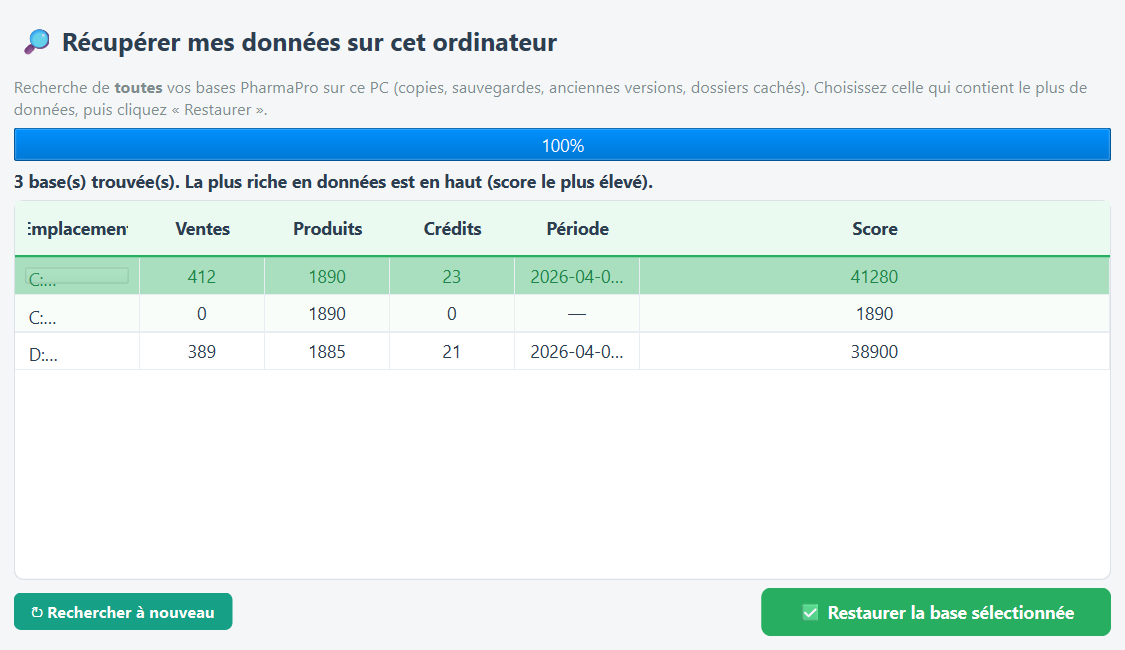
- Manually (admin): 🔎 Chercher mes données sur ce PC (search for my data on this PC) opens « 🔎 Récupérer mes données », which searches copies, older versions and hidden folders for up to 30 seconds.
- Wait for the search to finish. The databases found are listed (Emplacement, Ventes, Produits, Crédits, Période, Score), the richest first; the current database is marked « ⟵ base actuelle ».
- Select the right row (often the first) and click ✅ Restaurer la base sélectionnée.
- Confirm in « Confirmer la restauration »; PharmaPro restarts.
↻ Rechercher à nouveau runs the search again. If the chosen database looks empty, PharmaPro asks for confirmation.
Encrypted cloud backup (optional)
Paramètres → Sauvegarde Cloud Chiffrée (zero-knowledge) → ☁️ Configurer & sauvegarder maintenant:
- Enter the 🔑 Phrase de chiffrement: (encryption passphrase, 8 characters minimum), then 💾 Enregistrer la phrase.
- Click ☁️ Sauvegarder maintenant.
- The copy is encrypted on your PC before it is sent; the TKAWEN server cannot read it.
- A licence activated online (PHRP-… key) is required; otherwise the button is disabled.
- The server keeps the 14 most recent backups.
- Once the passphrase is saved, PharmaPro sends a backup about once a day, 30 seconds after startup, without any window.
- ↩️ Restaurer une sauvegarde… lists the cloud copies, asks for the passphrase used, replaces the database (the old one is renamed
pharma.db.before-restore-...) and asks you to reopen PharmaPro.
Frequently asked questions
Where does PharmaPro save the pharmacy's database?
In %LOCALAPPDATA%\TKAWEN\PharmaPro\data\pharma.db, with the automatic backups in the neighbouring backups folder. The exact path is shown on the Sauvegarde page.
How do I back up my data to a USB stick?
Sauvegarde page → "📥 Télécharger une copie de mes données", then choose the stick: a .pharmabak file containing all the data is created.
After reinstalling, the software is empty. What should I do?
Click "🔎 Chercher mes données sur ce PC" in Sauvegarde, select the richest database, then "✅ Restaurer la base sélectionnée".
How many automatic backups are kept?
One is made at every startup; the 30 most recent are kept in the backups folder.
I have forgotten my cloud encryption passphrase. Can it be recovered?
No. The copies are encrypted on your PC; without the passphrase nobody can decrypt them. Keep it in writing.
Try PharmaPro in your pharmacy
15 days free with every feature, then 45 000 DZD once.
Download and try freeBuy the licence