Steps at a glance
- Open Clients / Patients and click ➕ Ajouter Client, or edit an existing patient.
- Fill in the Maladie Chronique field.
- Tick Planifier une visite, choose the date, then click 💾 Enregistrer.
- Click 🔔 Patients chroniques to open the reminder.
- In "Afficher ce rappel", choose À chaque ouverture du programme or a day of the week.
- Tick or untick "🔊 Son à l'ouverture", then click J'ai pris note.
Open the page and add a patient
Open Clients / Patients (patients) in the sidebar. The page is available to all users (admin and worker). The table shows: ID, Nom (name), Téléphone (phone), Age, Sexe (sex), Maladie Chronique (chronic condition), Prochaine Visite (next visit), Remarques (notes); the number of records is shown at the bottom.
- Click ➕ Ajouter Client (add client).
- Enter the full name in 👤 Nom * — the only required field (otherwise: « Le nom est obligatoire. »).
- Fill in Téléphone. If it is an Algerian mobile number (10 digits starting with 0, e.g. 05, 06, 07, or in +213 format), a WhatsApp button will appear in the reminder.
- Optional: 🎂 Age (0 to 150) and ⚧ Sexe (Homme / Femme).
- In 🏥 Maladie Chronique, type the condition as free text (diabetes, hypertension…). This is the field that puts the patient into the reminder.
- To set the next visit, tick Planifier une visite (schedule a visit) and pick the date in 📅 Prochaine Visite. Box unticked = no date is saved.
- Add 📝 Remarques if needed, then 💾 Enregistrer (save).
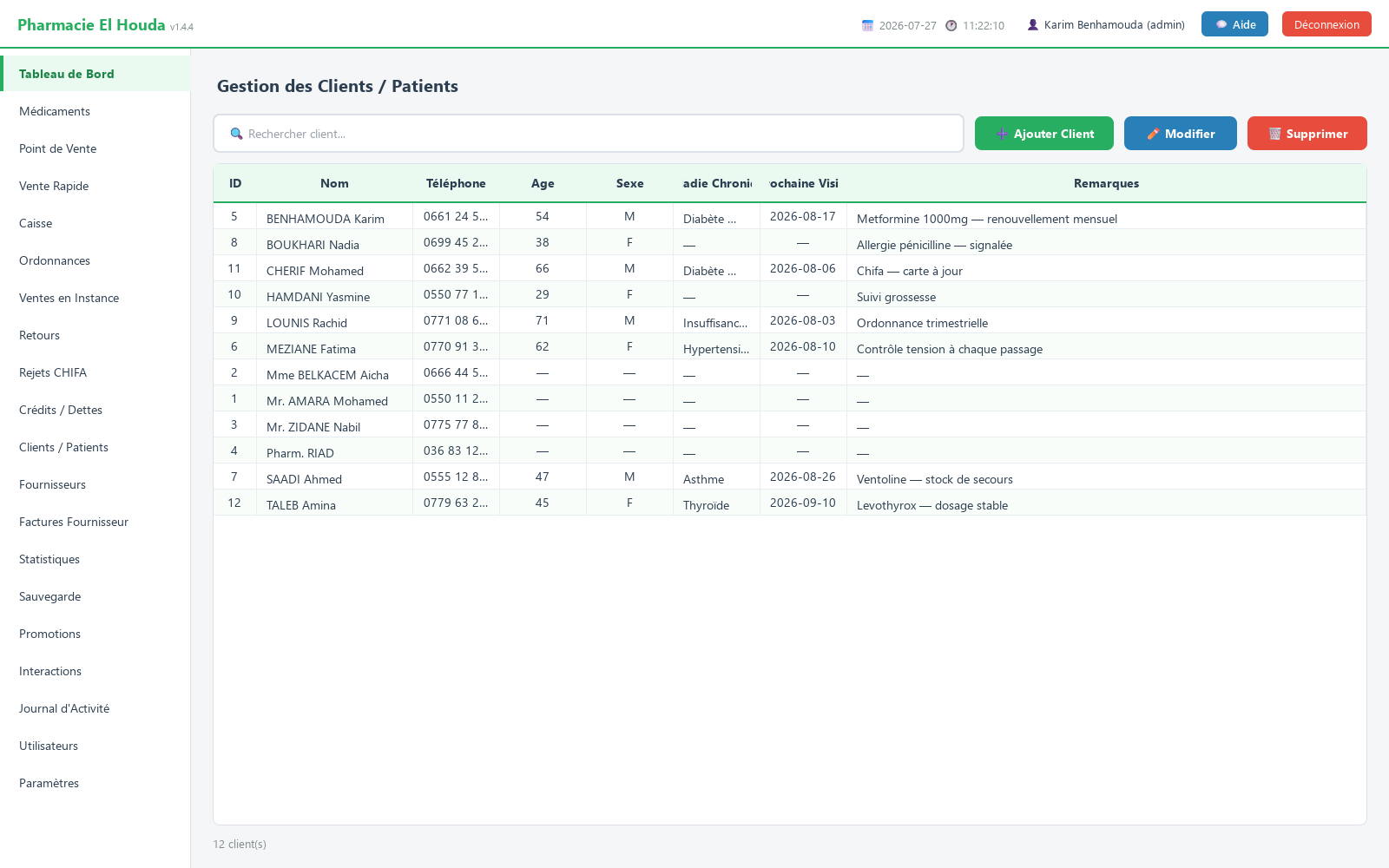
Edit or delete a record
- Edit: select the row, then ✏️ Modifier (edit), or double-click it.
- Delete: select the row, 🗑️ Supprimer (delete), then confirm.
Every addition, edit and deletion is recorded in the Journal d'Activité (activity log) under the user's name.
The chronic-patient reminder: what it shows
The Rappel — patients chroniques window lists every patient whose Maladie Chronique field is filled in. Columns: Nom, Maladie chronique, Téléphone, Prochaine visite, Contact.
| Status | Meaning |
|---|---|
| En retard (red) | the next-visit date has passed |
| Cette semaine (orange) | visit within the next 7 days |
| Non planifiée | no visit date in the record |
Order: patients with a date first, nearest date at the top, then those without a date in alphabetical order.
Urgent first: if only some patients are overdue or expected this week, the window opens on those alone and offers the Afficher tous les patients chroniques (N) box (show all chronic patients); tick it to see the full list, untick it to return to the urgent ones. If none are urgent, or all of them are, the full list is shown directly.
The WhatsApp button in the Contact column opens a conversation with the patient (only for a valid Algerian mobile number). At the bottom: J'ai pris note (noted) closes the window; Ouvrir Clients / Patients (when opened automatically) takes you to the patients page.
When does it open? A chosen day or at every startup
At the bottom of the window, the 🔔 Afficher ce rappel : line (show this reminder) offers:
- À chaque ouverture du programme (every time the program opens) — the default setting: the window opens by itself a few seconds after the main window, at every startup. Message shown: « S'ouvre à chaque démarrage de PharmaPro ».
- Chaque lundi … Chaque dimanche (every Monday … every Sunday) — a weekly reminder on the chosen day. If the pharmacy is closed that day, it opens at the next startup (e.g. on Monday for a Sunday reminder), and never twice in the same week. The next date is shown: « Prochain rappel : … ».
- Jamais (désactivé) (never) — no more automatic opening (« Rappel désactivé »).
The choice is saved immediately (« ✓ Enregistré »). When you choose a day, the current week counts as seen — you have the list in front of you — and the next reminder comes on the chosen day.
The same setting exists in Paramètres → Alertes et Seuils → Rappel des patients chroniques :, confirmed with 💾 Enregistrer les Paramètres (page restricted to the admin).
The reminder sound
The 🔊 Son à l'ouverture box (sound on opening), ticked by default, plays a short chime only when the window opens by itself at startup, not when you open it with the button. When you tick it, the sound plays once so you can hear it. Untick it to keep the window without the sound.
Visits on the dashboard and on Telegram
- The Tableau de Bord (dashboard) shows the VISITES PATIENTS À VENIR alert (upcoming patient visits): up to 5 patients whose visit falls between today and the number of days set in Alerte peremption (jours) (30 by default).
- If Surveillance à distance (Telegram) (remote monitoring) is enabled, the list of chronic patients is sent to you once a week, on the reminder day (Sunday by default) from 9 a.m. — even in "every time the program opens" mode, so that your phone does not ring at every launch. On-demand commands:
/chroniquesor/patients.
Loyalty programme
Disabled by default. To enable it (admin): Paramètres → Programme de fidélité:
- 💎 Carte fidélité : (loyalty card) choose Activé.
- DA dépensés pour 1 point gagné : (DZD spent per point earned; 100 by default).
- Valeur en DA d'1 point utilisé : (DZD value of 1 point redeemed; 1 DZD by default).
- 💾 Enregistrer les Paramètres.
In the Point de Vente (point of sale), the 👤 Client (fidélité) : panel appears: choose the patient (their balance is shown in brackets), then enter the points in Utiliser points : (use points). You cannot use more than the balance; the discount never exceeds the sale amount.
Points are earned on the net amount, only for a completed sale; a sale on hold earns nothing. The balance does not appear in the patients table, only in the Point de Vente client list.
Frequently asked questions
How do I make a patient appear in the chronic-patient reminder?
Open their record in Clients / Patients and fill in "Maladie Chronique". To move them to the top, tick "Planifier une visite" and set the next-visit date.
How do I change the reminder day or show it at every startup?
Use "Afficher ce rappel" at the bottom of the reminder window, or Paramètres → Alertes et Seuils → Rappel des patients chroniques. Options: À chaque ouverture du programme, a day of the week, or Jamais (désactivé).
How do I turn off the reminder sound?
Untick "🔊 Son à l'ouverture" in the reminder window. The window still opens, without sound.
Why are not all my chronic patients shown?
The window opens on the patients who are overdue or expected this week. Tick "Afficher tous les patients chroniques" to see the full list.
Why can't I delete a patient?
The patient is linked to a prescription or a sale; deleting would erase that history. Edit the record instead.
Try PharmaPro in your pharmacy
15 days free with every feature, then 45 000 DZD once.
Download and try freeBuy the licence